Coding 1 Exercise Instructions
Introduction
In this exercise you will write your first app!
Over the next two weeks we're going to write a fully functioning Section 58 Calculator app, much like what you saw in Week 8.
This week we are going to prepare all the screens and have your app execute them one by one. Next week we will add in the decision logic and the calculation logic.
Preparation Work
You must have completed all the preparation work before class.
Teaching staff will not walk students through preparation work, especially connecting to the server, in class. You will need to complete this work yourself before this class.
You may always book a consult with teaching staff if you run into trouble. Check the topic FLO page for consult links.
For this execise you will need to refer to the Section 58 Calculator flowchart and screens. They are available in the left menu.
The Exercise
For this week we are creating the application screens only and setting up the app so it displays each screen in turn. We're not adding any application logic, except for enough to make the application run and display each screen.
Work through these steps to create your program
Create the opening screen as a mandatory question block
Our opening screen is Screen 1.
- Create a question block. Make sure it is mandatory
- The title should be 'Welcome'
Set the title by setting a value for the question tag
- The content of the
subquestionshould be thte text of the screen as set out in Screen 1 - Add Continue and Exit buttons
Hint: Your mandatory question block should look like this
---
mandatory: True
question: Welcome
subquestion: |
  Welcome to the Gratuitous Services Calculator App.  This app helps you to work out if you can claim for gratuitous services provided to you by your family when you were injured.

  Gratuitous services are services that are provided to you for free
buttons:
  - Continue: continue
  - Exit: exit
---
Save and run your code
- Your first screen should be displayed.
- If you press Continue youll get an error message. This is normal. Your app is complaining becoare there are no other screens to continue on to.
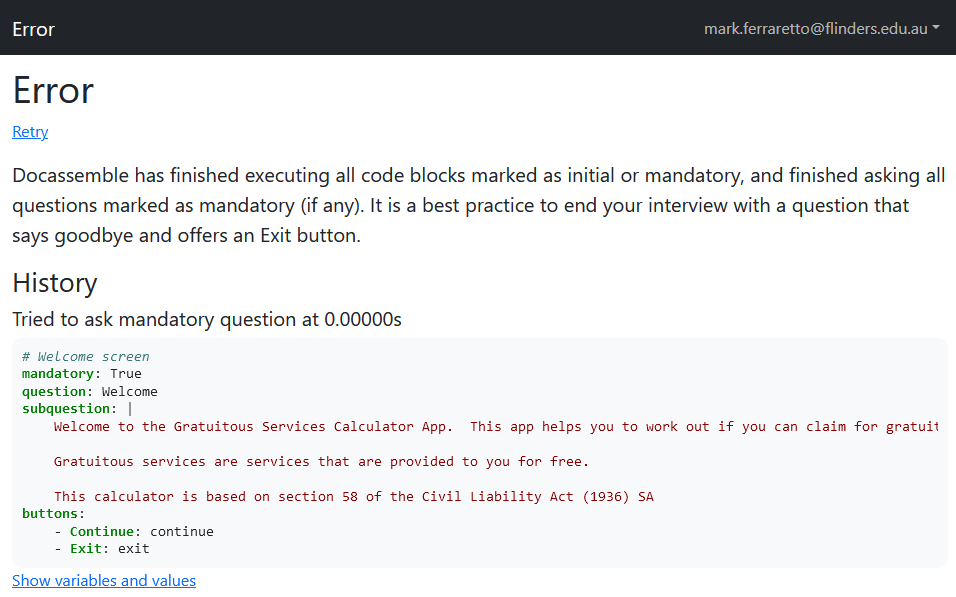
Create a mandatory code block
In the final version of your app this code block will drive the execution of your app. That is, this code block will contain all the decision-making logic that ensures your app runs correctly. For this week though we're going to start with an empty code block. As we make each additional screen we'll just add a command to this code block to display the screen.
- Create a code block under your Screen 1
- Make sure it's mandatory
- In the code block just type in 'pass`. This tells Python not to do anything when the code block is run
Your code block should look something like this:
---
# Mandatory code block. Drives the app
mandatory: True
code: |
  pass
---
Add Screen 2
Screen 2 is the question screen that asks the user if they received any gratuitous services.
We are going to use a radio datatype to present the user with the two choices. The choices are set out in our screen.
- create a question block below the mandatory code block
- this question block should not be mandatory
- set the title according to Screen 2
- set the content of the question to the contents of Screen 2
The content of the question gets placed in a subquestion in Docassemble.
- we will need a
fieldstag and that tag will containe one question and one variable - you can name the variable what you like. A good practice is to put your initials at the beginning of your variable name eg:
MJFis_gratuitous. - The field can have
no labelas its question label, as we've already put words in thesubquestionwhich let the user know what we're asking - use a
radiodatatype for the field - the choices should be the text set out in Screen 2
- After each choice add a colon (
:) and then eitherTrueorFalse. Screen 2 tells you which to put where
Hint: Your question block should look something like this
---
# Screen 2
question: Gratuitous Services
subquestion: |
  Did you receive gratuitous services while you were injured?

  Gratuitous services are services, such as cleaning or caring provided to you at no cost.
fields:
  - no label: MJFis_gratuitous
    datatype: radio
    choices:
      - I received services and I did not pay for any of them: True
      - I received services but I did pay for them: False
---
Update the Mandatory code block and run your app
Go back to the mandatory code block you just created. Replace pass with the variable name you provided for Screen 2 (MJFis_gratuitous in our example).
---
# Mandatory code block. Drives the app
mandatory: True
code: |
  MJFis_gratuitous
---
Save and run your application.
- You should now see the first screen.
- Press Continue. You should be taken to your question screen.
- Continue again and you'll get the same error again, because your app has run out of screens.
Add Screen 4
Screens 3, 5, 7 and 8 are all exit screens. We won't add these now because we won't be able to test our app (as it will exit at the first exit screen). We'll create Screen 8 at the end of this exercise and we'll create the rest next week when we insert the decision logic.
Screen 4 asks who provided the gratuitous services. We'll need another question screen just like Screen 2.
- Create a new question block and set the title and the question body according to Screen 4
- We need to add a
fieldstag again. - We can use a
no labelfor the field again. Feel free to use a label if you prefer. - Choose a different variable name for this field. In the example below we'll use
MJFwho_provided. - We also want to use the
radiodata type again. - The choices for the
radiothis time are the options that are displayed in the flowchart proper. - This time we don't add any
TrueorFalseat the end. We'll explain this next week.
Hint: Your code should look something like this
---
# Screen 4
question: Provision of Services
subquestion: |
  Who provided the gratuitous services to you?
fields:
  - no label: MJFwho_provided
    datatype: radio
    choices:
      - Parent
      - Spouse
      - Domestic Partner
      - Child
      - Someone Else
---
Save and run your code
Add your variable to the mandatory code block. You should now have something that looks like this:
---
# Mandatory code block. Drives the app
mandatory: True
code: |
  MJFis_gratuitous
  MJFwho_provided
---
If you run your code you should be able to continue through your first screen and the two question screens before you error out as before. If so, then you're doing well!
Add Screen 6
Let's see if you can do this with less instruction.
- create a question block and fill it out in accordance with Screen 6
- set the data type of your variable to
currency
Hint: Your code should look something like this
I've decided to use the variable name MJFamount_claimed for this screen.
---
# Screen 6
question: Amount Claimed
subquestion: |
  What amount of damages are you claiming for the provision
  of gratuitous services to you while you were injured?
fields:
  - no label: MJFamount_claimed
    datatype: currency
---
Save and run your code
- Add your variable to the mandatory code block
- Save and run
The app should display all four screens you have created.
Add Screen 8
Screen 8 is an end screen, or an 'exit screen'. As you can see from the chart Screen 8 is one of the points at which the app completes. Therefore, we don't want a Continue button displayed on this screen. Instead we'll want Exit and Restart buttons instead.
We let Docassemble know this is an end screen by using the event tag. We set the name of the event tag to yet another variable. This tells Docassemble that when we call that variable Docassemble is to display this screen and exit the app.
Our exit screen look similar to the first mandatory question block we created, but with two differences:
- Instead of starting with
mandatory: Truewe will start with oureventtag. - Instead of specifying Continue and Exit buttons, we're going to specify an Exit and a Restart button.
- decide on a variable name for your exit screen. For our example we'll use
MJFexit_screen8 - create a new block. Add the event tag. It should look like this
event: MJFexit_screen8
(or whatever the name you've chosen for your variable) - Complete the
questionandsubquestiontags as you would for any other Screen - Add a button with a label of 'Exit' and that carries out the command
exithintThat would look something like this
buttons:
- Exit: exit - Add a Restart button. The restart command is called
restart.
Hint: Your code should look something like this
---
# Screen 8
event: MJFexit_screen8
question: You May be Eligible
subquestion: |
  According to section 58 of the *Civil Liability Act* you may be
  able to claim for gratuitous services
buttons:
  - Exit: exit
  - Restart: restart
---
Save and run your app
- Add the variable name you've chosen to your mandatory code block
- Save and run your app
Your application should run all the way to Screen 8. No more errors!
This week's solution code
Here is an example solution of the entire program we have written this week
---
mandatory: True
question: Welcome
subquestion: |
  Welcome to the Gratuitous Services Calculator App.  This app helps you to work out if you can claim for gratuitous services provided to you by your family when you were injured.

  Gratuitous services are services that are provided to you for free
buttons:
  - Continue: continue
  - Exit: exit
---
# Mandatory code block. Drives the app
mandatory: True
code: |
  MJFis_gratuitous
  MJFwho_provided
  MJFamount_claimed
  MJFexit_screen8
---
# Screen 2
question: Gratuitous Services
subquestion: |
  Did you receive gratuitous services while you were injured?

  Gratuitous services are services, such as cleaning or caring provided to you at no cost.
fields:
  - no label: MJFis_gratuitous
    datatype: radio
    choices:
      - I received services and I did not pay for any of them: True
      - I received services but I did pay for them: False
---
# Screen 4
question: Provision of Services
subquestion: |
  Who provided the gratuitous services to you?
fields:
  - no label: MJFwho_provided
    datatype: radio
    choices:
      - Parent
      - Spouse
      - Domestic Partner
      - Child
      - Someone Else
---
# Screen 6
question: Amount Claimed
subquestion: |
  What amount of damages are you claiming for the provision
  of gratuitous services to you while you were injured?
fields:
  - no label: MJFamount_claimed
    datatype: currency
---
# Screen 8
event: MJFexit_screen8
question: You May be Eligible
subquestion: |
  According to section 58 of the *Civil Liability Act* you may be
  able to claim for gratuitous services
buttons:
  - Exit: exit
  - Restart: restart
---