Coding - User questions
Ask the user about their circumstances
In our design we got to the point
where we nominated four variables to store the answer to our four questions. Let's
code these and put them into questions.yml.
We could ask all four questions in a single question block. However, ABC have told us that it is better to present one question at a time. Doing so makes our app more accessible to users with intellectual disabilities or other cognitive impairments.
---
question: Age
fields:
 - Enter your age: MJFage
   datatype: integer
   min: 0
---
question: Gender
fields:
  - Select your gender: MJFgender
    datatype: radio
    choices:
      - Female
      - Male
      - Other
---
question: Location
subquestion: |
  Select the location or locations where you are looking for services.

  You may select as many locations as you like
fields:
  - no label: MJFlocation
    datatype: checkboxes
    choices:
      - North
      - South
      - East
      - West
---
question: Accommodation type
subquestion: |
  Are you looking or accommodation just for yourself or
  for yourself and your family?
fields:
  - no label: MJFfamily
    datatype: radio
    choices:
      - I am looking for accommodation for myself: single
      - I am looking for accommodation for my family: family
---
MJFage
We want to limit the input field to integers, so that users can't input, say 'twenty-one' instead of
'21' as an age. We're also using the min input validation
to prevent our user from entering a negative number as an age.
MJFgender
As we discussed in our design, the user must select from a list of genders. We are including only 'Female', 'Male' and 'Other' for our app.
Our choices in the MJFgender question must match the strings we use for gender in MJFservices.
Be mindful that our code is case sensitive. So, be sure to always use 'Male' and not 'male' or 'MALE'.
Otherwise, our gender membership test will fail.
MJFlocation
We need to use the checkboxes datatype for this question so the user can select multiple locations.
Also, be mindful that our choices must match exactly the list items in the location key in MJFservices,
otherwise location matches will fail (see the note in MJFgender above).
MJFfamily
This question block is similar to the MJFgender question. However, the choices items are slightly
different. With MJFfamily we want to present a more detailed explanation in the choice items but we
don't want to copy those lengthy explanations as our family list items in MJFservices. By using
key/value pairs for our choices we can display
descriptive text to the user but save a more concise value in our variable.
Same as MJFgender and MJFlocation remember that variable data is case sensitive. Unlike MJFgender
and MJFlocation we've decided that our variable data for MJFfamily is all in lower case. That's an
arbitrary choice made by us. We just need to sure to be consistent.
Testing
We need to modify our main.yml to make it aware of our questions. Do this by adding this include block
at the top of main.yml
---
include:
  - questions.yml
---
Next, we need a quick way to call the questions from main.yml. We have two options.
Our first option is that we could modify our mandatory coding block to call each of the variables eg:
mandatory: True
code: |
  MJFage
  MJFgender
  MJFlocation
  MJFage
  final_screen
The second option is to display the values of the four variables in our final screen. This is our preferred option for these reasons: First, doing so has the practical benefit that we can see the values that are stored in each variable. Secondly though, this is the way Docassemble prefers us to do things (see below)
Let's modify our final_screen to display our question variables. That will cause them to be asked.
---
event: final_screen
question: Final Scren
subquestion: |
  Eventually the list of services will be displayed here

  Our variables:

  * ${MJFage}
  * ${MJFgender}
  * ${MJFlocation.true_values()}
  * ${MJFfamily}
buttons:
  - Exit: exit
  - Restart: restart
---
Our main.yml should now look like this:
---
include:
  - questions.yml
---
mandatory: True
question: Welcome screen
subquestion: |
  Welcome screen text will go here eventually.
buttons:
  - Continue: continue
  - Exit: exit
  - Restart: restart
---
# This code block drives our app
mandatory: True
code: |
  final_screen
---
# This is our final screen
event: final_screen
question: Final Scren
subquestion: |
  Eventually the list of services will be displayed here

  Our variables:

  * ${MJFage}
  * ${MJFgender}
  * ${MJFlocation.true_values()}
  * ${MJFfamily}
buttons:
  - Exit: exit
  - Restart: restart
---
If you run the app now you will be asked the four questions and their values will be displayed in the final screen.
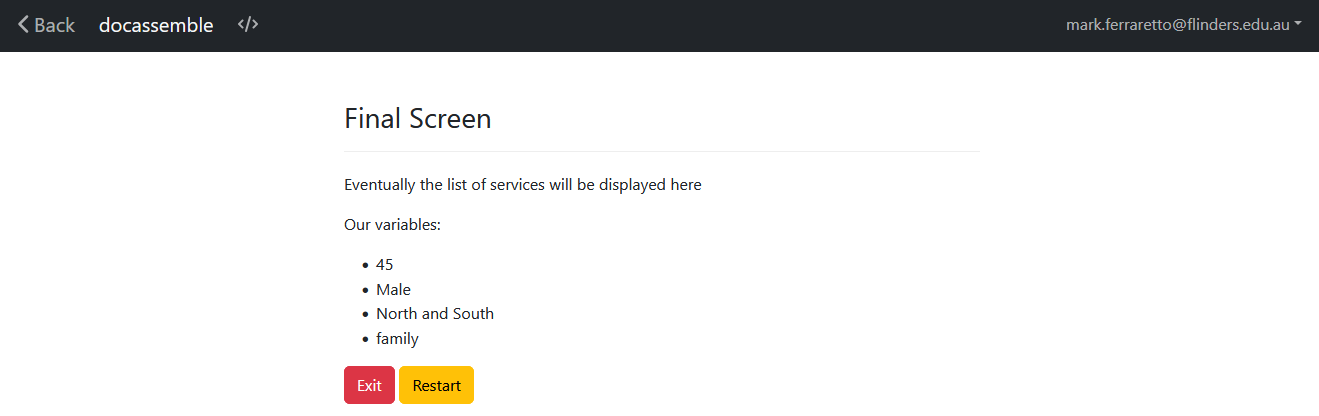
For MJFlocation we had to use the true_values() method to only display the selected locations.
For more information on true_values() check out the Docassemble manual.
Docassemble is Declarative
Docassemble is what's known as a declarative language. Most programming languages are imperative languages. In an imperative language you tell the computer what to do and when and how to do it. Our first option is the imperative option because we're telling Docassemble: 'first get the values of the four variables and then display the final screen' - we're telling Docassemble what to do and the order in which to do it.
In a declarative language we write code in blocks (sound familiar?) and let the system decide which block to run and when. So, in a declarative language we would write code to display a screen containing variable values and then we'd leave it up to the system to decide which code block to call and when.
Docassemble is delcarative. It breaks code up into blocks and calls code blocks as it needs them. Declarative systems have some advantages over imperative systems. Programmers can focus on writing code that 'does stuff' instead of trying to work out the best way to bring code together. The execution order of code blocks is left to the system itself which should be able to work out the most efficient way to execute your app. This can result in writing less code that's easier to read.
Declarative systems also have their drawbacks. Most software developers are trained on and work with imperative languages. Consequently, adjusting to a declarative model can take some time and can be frustrating.
Finally, we should note that a declarative program must be told where to start! That's where our
mandatory blocks come in. As much as possible we limit our mandatory blocks to two - one for
the welcome screen and a code block to drive the app. However, we try to keep the logic in our
code block to a minimum and have our app run as declarative as possible.
To conclude, that's why we'll place our variables into final_screen for testing. We're preserving
the declarative model and leaving the execution order up to Docassemble.
You will find that we will put as little as possible into the mandatory code block and most of our app will be driven by the display of the relevant services in our final screen.