More Advanced Jinja in Docassemble
Now that we have covered how to add Jinja fields to a template in Docassemble, we will consider how to create more advanced templates, and how to integrate these into the features in Word. This section will also cover some more advanced material on groups, which we considered previously in Chapter Five.
Creating More Advanced Templates
For this section, we will reuse our Form 17 generator application code. We have been asked to extend our application in a number of ways:
- Our user should be able to enter a matter number for their application
- Our application should be able to display multiple applicants or respondents
- Our application should allow a user to enter their pleadings as a numbered list
- If our template is being filed by a lawyer for the applicant or the respondent, our application should allow our user to fill in the following details
- Law Firm
- Date of Certification
- If our templater is not being filled in by a lawyer, the paragraph on
- Irrespective of who is filing the application, our user should be able to fill in:
- Who prepared the form
- Telephone Number
- Fax Number
- Address for service
- All dates should be formatted in an Australian Guide to Legal Citation format
- The user can only download the file as a PDF
Amending our Flowchart
For these changes, we will need to amend our overall flowchart we developed previously:
Amending Our Application
Once we have amended our flowchart we will need to amend both our Docassemble application.
# We will define an objects block to store our endpoint DADict object
# We will also define a new DAList object in this block to store our pleadings
# We know that our form must have at least one pleading
---
objects:
  - endpoint: DADict
  - soc: DAList.using(there_are_any=True, object_type=DAObject, complete_attribute='pleading')
---
# Welcome Screen for Form 17 generator app
# This screen contains information about what the app does, as well as a disclaimer
# It also contains a continue and exit button
mandatory: True
question: Federal Court Form 17 generator app
subquestion: |
  Welcome to the Form 17 generator app

  This application will help you generate a [Form 17](https://www.fedcourt.gov.au/forms-and-fees/forms/federal-court-rules/FCA_form017_20110801.doc). You can then file this form in either the Federal Court of Australia, or the Federal Circuit and Family Court of Australia.

  *Please note that forms completed by this application should be checked by a lawyer first. This app does not provide any legal advice.*

  Please click **Continue** to accept these terms. Otherwise, click **Exit**.

buttons:
   - Continue: continue
   - Exit: exit
---
# First question block
# This asks the user in which court they are filing their application
# Note that they can only choose one court
question: In which court are you filing your application
fields:
  - no label: userCourtFiling
    datatype: radio
    choices:
      - Supreme Court
      - District Court
      - Magistrates Court
      - Federal Court of Australia
      - Federal Circuit and Family Court of Australia
---
# Code block
# This code block directs the user to the eligible or ineligible screen depending on their answers.
mandatory: True
code: |
  if userCourtFiling == 'Federal Court of Australia' or userCourtFiling == 'Federal Circuit and Family Court of Australia':
    endpoint['eligible']
  else:
    endpoint['ineligible']
---
# Ineligible screen
# This screen is selected if we select either Magistrates, District or Supreme Court
event: endpoint['ineligible']
question: You are not eligible
subquestion: |
  This application is meant to help users complete a Form 17 to submit to the Federal Court of Australia or the Federal Circuit and Family Court of Australia.

  Because you are not submitting a form to either of these courts, you are not eligible to use this application.

  Please press **Exit** to exit this application or **Restart** to restart.
buttons:
  - Exit: exit
  - Restart: restart
---
# Our question block
# This is where we gather the details to fill in our form
question: Please fill out these details to complete your Form 17
fields:
  - Matter Number: courtMatterNo
    datatype: integer
  - State of District Registry: courtRegistry
    datatype: radio
    choices:
      - ACT
      - NSW
      - NT
      - QLD
      - SA
      - TAS
      - VIC
      - WA
  - National Practice Area/Division: courtNPA
    datatype: radio
    choices:
      - Administrative, Constitutional Law and Human Rights
      - Admiralty and Maritime
      - Commercial Contracts, Banking, Finance and Inusrance
      - Corporations and Corporate Insolvency
      - General and Personal Insolvency
      - Regulatory and Consumer Protection
      - Economic Regulator, Competition and Access
      - Commercial Arbitration
      - Employment and Industrial Relations
      - Federal Crime and Related Proceedings
      - Patents and Associated Statutes
      - Trade Marks
      - Copyright and Industrial Design
      - Native Title
      - Family Law
      - Migration
      - Privacy Law
  - Full Name of the Applicant: applicantFullName
    datatype: string
  - Only Applicant?: onlyApplicant
    datatype: yesnoradio
  - How many other Applicants?: otherApplicants
    datatype: radio
    choices:
      - One
      - Two or more
    show if:
      variable: onlyApplicant
      is: False
  - Full Name of the Respondent: respondentFullName
    datatype: string
  - Only Respondent?: onlyRespondent
    datatype: yesnoradio
  - How many other Respondents?: otherRespondents
    datatype: radio
    choices:
      - One
      - Two or more
    show if:
      variable: onlyRespondent
      is: False
  - Who is completing this Form? : whoFiledForm
    datatype: string
  - Who prepared this Form?: whoPreparedForm
    datatype: string
  - In what capacity are they Acting?: capacityOfFiler
    datatype: radio
    choices:
      - Applicant
      - Respondent
      - Lawyer for the Applicant
      - Lawyer for the Respondent
  - Law Firm: lawFirm
    datatype: string
    js show if: |
      val("capacityOfFiler") == "Lawyer for the Applicant" || val("capacityOfFiler") == "Lawyer for the Respondent"
  - Telephone Number: telNumber
    datatype: integer
  - Fax Number: faxNumber
    datatype: integer
  - Email: contactEmail
    datatype: email
  - Address for Service: addressForService
  - Date of filing: dateOfFiling
    datatype: date
  - Date of certification: dateOfCert
    datatype: date
    js show if: |
      val("capacityOfFiler") == "Lawyer for the Applicant" || val("capacityOfFiler") == "Lawyer for the Respondent"
---
# Pleadings initial question
# This question asks for the first pleading
question: |
  What is the ${ ordinal(i) } pleading in your statement of claim?
fields:
  - Pleading: soc[i].pleading
---
# This question asks if there is another pleading
question: |
  Is there another pleading?
yesno: soc.there_is_another
---
# Eligible screen
event: endpoint['eligible']
question: You are eligible
subquestion: |
  Thank you for completing this form

  Please find attached your answers:

  Questions | Your Answers
  ----------|-------------
  Court | ${userCourtFiling}
  Matter Number | ${courtMatterNo}
  District Registry | ${courtRegistry}
  NPA/Division | ${courtNPA}
  Applicant | ${applicantFullName}
  % if onlyApplicant:
  Only Applicant? | Yes
  % else:
  Only Applicant? | No
  % endif
  Respondent | ${respondentFullName}
  % if onlyRespondent:
  Only Respondent? | Yes
  % else:
  Only Respondent? | No
  % endif
  Who Completed the Form | ${whoFiledForm}
  Who Prepared this Form | ${whoPreparedForm}
  Capacity of Filer | ${capacityOfFiler}
  % if capacityOfFiler == 'Lawyer for the Applicant' or capacityOfFiler == 'Lawyer for the Respondent':
  Law Firm | ${lawFirm}
  % endif
  Telephone Number | ${telNumber}
  Fax Number | ${faxNumber}
  Contact Email | ${contactEmail}
  Address for Service | ${addressForService}
  Date of Filing | ${dateOfFiling}
  % if capacityOfFiler == 'Lawyer for the Applicant' or capacityOfFiler == 'Lawyer for the Respondent':
  Date of Certification | ${dateOfCert}
  % endif

  Your statement of claim:

  % for x in soc:
  1. ${ x.pleading }
  % endfor

attachment:
  docx template file: Federal_Court_Form_17_Final.docx
  valid formats:
    - pdf
buttons:
  - Exit: exit
  - Restart: restart
---
# In this code block, we turn the date of filing (and the date of certification, if the matter is being filed by a lawyer) into an AGLC compliant date
# We also strip out the year so we can record the matter year
code: |
  dateOfFilingAGLC = format_date(dateOfFiling, format='d MMMM YYYY')
  matterYear = format_date(dateOfFiling, 'YYYY')
  if capacityOfFiler == 'Lawyer for the Applicant' or capacityOfFiler == 'Lawyer for the Respondent':
    dateOfCertAGLC = format_date(dateOfCert, format='d MMMM YYYY')
---
We also have a new template to include, which you can donwload here.
As with the previous code, you can copy and paste this application directly into your Docassemble playground. You can also upload the template above into your Docassemble playground. Legal Aid NSW has a sample statement of claim that you can use to help test your application as well.
Using If Statements in Jinja
The first thing different that we have implemented in this version is a series of if statements in our Jinja template. These if statements allow us to control the content that we insert into our template.
Jinja if statements are similar to Mako if statements which we previously considered in Chapter Four, except:
- The if statement needs to be encased in braces, or curly brackets
- The if statement clause should start and end with a
%symbol - There needs to be an
endifclause encased in a single set of curly brackets and a set of%symbols.
For example, if our form is being prepared by a lawyer, we only want certain content to be displayed, such as the name of the law firm. We can do this using Jinja if statements. We have implemented this in our template in the following manner:

Note that in this screenshot we can also can see that for the variable next to Filed on behalf of, we have an if-elif statement block. We can use this block if we always want some text to be displayed.

We can also use if statements to insert or not insert whole paragraphs of text. For example, in our template we have a certificate signed by the lawyer that the form has been completed on Page 2:
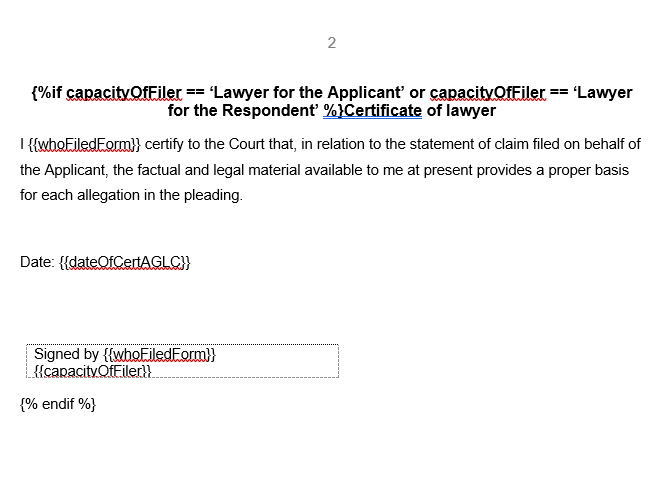
We can see from this screenshot that the entire paragraph is encased in an if statement. Therefore, if we state that the person signing this form is either the lawyer for the applicant or the lawyer for the respondent, this text will be displayed. Otherwise, it will not.
Using Complex Data Structures
One of the requests for us to modify our application has been to allow the user to enter each pleading as a numbered list in our complete template. We can do this using for loops and objects.
You might recall that in Chapter Five, we covered data structures such as Lists and Dictionaries. These data structures are Python data structures. Docassemble has its own inbuilt data structures as well. These are donated by the prefix DA-.
In this section, we will be covering one of those data structures types called DAList. An object of DAList is like a regular Python list, but it also has certain properties.
Declaring a List of Pleadings
In our application, we will use our list to store each of our pleadings. We first need to declare our list of pleadings. We do this in the objects block on Line 7 of our application.
---
objects:
  - endpoint: DADict
  - soc: DAList.using(there_are_any=True, object_type=DAObject, complete_attribute='pleading')
---
You might have noticed that soc (which stands for 'statement of claim') is declared a little differently to endpoint immediately above it. Specifically:
- A
DAListis an object with methods. One of those methods is.using, which we use when we create the object. - When we use a method, we follow the method keyword with a set of parentheses or brackets. We can then put in parameters into these brackets.
- Our first parameter is
there_are_any. This sets a Boolean attribute for our object on whether there are any values to gather. Because our statement of claim will have at least one pleading, we set this to True.] - Our second parameter is our object type. This will be the object which will be contained in our list. We will set this to a
DAObject, which is a special Docassemble object type. - Our third parameter is
complete_attribute. This sets the name of an attribute for each object in ourDAList. To gather an object and add it to a list, we need to set the value for this attribute. In our application, we are setting ourcomplete_attributeto 'pleading'.
If you do not know what all of these terms mean, do not worry. For now, this is all you need to know in order to create a DAList in Docassemble.
Filling In Our List
Now that we have declared our DAList obiject, the next step is to fill our list. We can do that with the two question blocks that we have defined on Lines 153 to 164.
---
# Pleadings initial question
# This question asks for the first pleading
question: |
  What is the ${ ordinal(i) } pleading in your statement of claim?
fields:
  - Pleading: soc[i].pleading
---
# This question asks if there is another pleading
question: |
  Is there another pleading?
yesno: soc.there_is_another
---
What will these two question blocks do? We know that because we have declared our DAList with there_are_any set to True, there must always be one pleading. Therefore, the first question block asking our user to set the pleading will be fired first.
The i in our code refers to the current index (or position) our DAList, as we discussed in Chapter Five. When we use the words ordinal, we are using an inbuilt Docassemble function which turns an integer into that integer plus one expressed as a word.
As we covered in Chapter Five, the first index for a list in Python (or any programming language) is position 0.
Therefore, the question block from Lines 154 to 160 will be executed first, which will ask for the first pleading in the statement of claim.
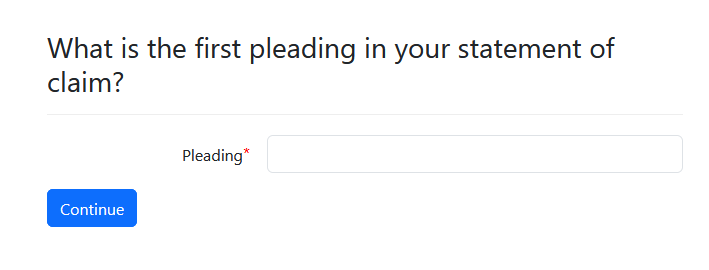
Once we have entered this pleading, the application will then fire the question on Lines 160 to 165. This question screen will ask the user to indicate whether there is another pleading.
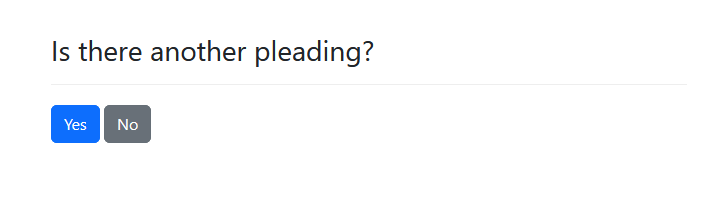
If the user presses Yes, they will be prompted to enter a statement of claim. This process continues until the user presses No, which will set the attribute there_is_another to False. At this point, the final eligible screen will be displayed, along with the full list of pleadings presented in a numbered list, which is generated by the for loop on Lines 209 to 211 of our application.
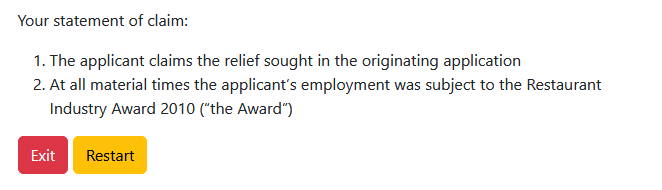
Note that we only have one numbered item on Line 210 of our application. However, Markdown will automatically number this list for us.
Using Paragraphs
If you look at our template, you will see that we have replicated the logic of our if statement.
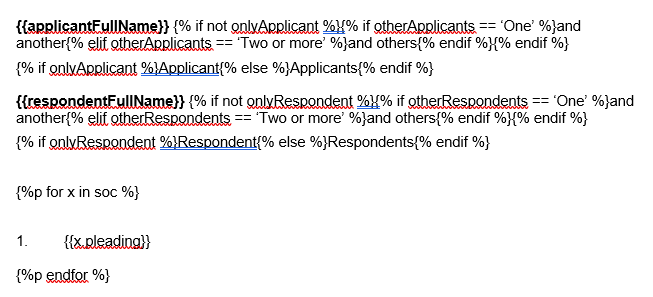
We can see that there are some differences between the for loop syntax we use in Mako and Jinja:
- Like an if statement in Jinja, our for loop must be encased in a single pair of curly brackets or braces
- The variable that we are referring to must be encased in a double pair of brackets
- Our
forloop andendforstatements need to be encased in a pair of%symbols.
However, we want to make sure that we avoid extra line breaks. We do this by putting a p immediately after our first % symbol and before the start of our for loop clause. This tells Docassemble that we need to remove the paragraph where our for loop clause is located.
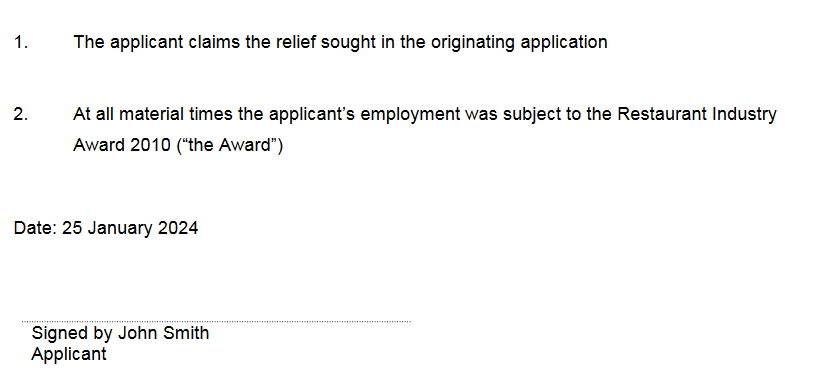
Using Functions
Our final instruction to improve our application was to ensure that the date of filing and the date of certificate are formatted in an AGLC format. We also need to extract the date from the date of filing to insert the matter year.
To do so, we need to format our dates using another inbuilt function in Docassemble - format_date:
---
code: |
  dateOfFilingAGLC = format_date(dateOfFiling, format='d MMMM YYYY')
  matterYear = format_date(dateOfFiling, 'YYYY')
  if capacityOfFiler == 'Lawyer for the Applicant' or capacityOfFiler == 'Lawyer for the Respondent':
    dateOfCertAGLC = format_date(dateOfCert, format='d MMMM YYYY')
---
First, we need to declare a new variable, dateOfFilingAGLC. We then use the format_date function. We pass dateOfFiling as the variable that we want to format as the first parameter. We then pass the date format we want to use as the second parameter. Dates in AGLC are formatted in a Day-Month-Year format, and the day should not be an ordinal number. Therefore, we use the format 'd MMMM YYYY'.
Second, we declare another new variable, matterYear. The only difference here is that we extract just the year of filing by using the YYYY format.
Third, we only declare a new variable called dateOfCertAGLC if capacityOfFiler is set to 'Lawyer for the Applicant' or 'Lawyer for the Respondent'. Note that dateOfCert will only be assigned a value if capacityOfFiler is set to 'Lawyer for the Applicant' or 'Lawyer for the Respondent'.
If we want to use variables that would only be displayed in certain circumstances, it is good coding practice to use show if clauses and if statements in both our question block and our templates.
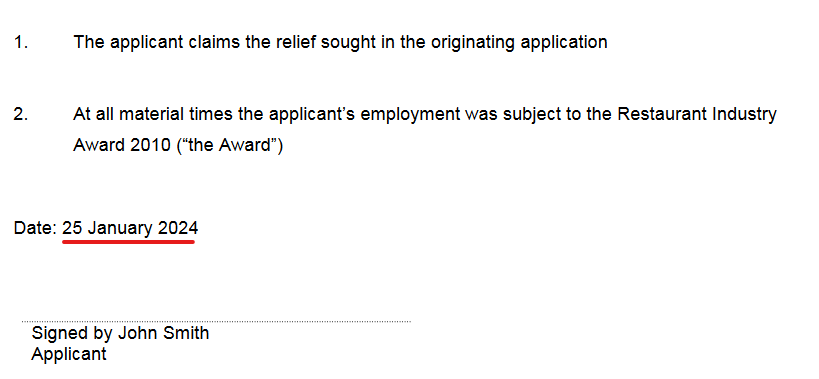
When we run our application, our dates will be formatted in an AGLC style:
Summary
In this section we have covered:
- How to use if statements in Jinja
- How to insert for loops into a Jinja template
- How to create paragraphs using Jinja
- When and how to use functions to format the output from our application